If you rely on TPM 2.0 measurement registers for secure boot, full disk encryption (such as systemd-cryptenroll or clevis), or system integrity monitoring, you know that unexpected changes in Platform Configuration Registers (PCRs) can break unsealing or signal unauthorized firmware/bootloader alterations. more informations https://g.raffi.wtf/e7OKN
To keep track of state changes over time and receive real-time desktop notifications when register states drift, I put together a simple, lightweight Bash utility: pcr-watch.sh.
What the Script Does
pcr-watch.sh automates the process of reading specified TPM 2.0 PCR registers, logging their state history, and alerting you via a GUI popup if the register values differ from the last recorded run.
Key features include:
- Targeted Monitoring: Defaults to sha256:7,11 (commonly used for Secure Boot state and unified kernel image/boot state), but configurable via environment variables.
- XDG State Directory Compliance: Stores execution logs in
${XDG_STATE_HOME:-$HOME/.local/state}/pcr-watch/pcrread.log. - State Drift Detection: Compares current tpm2_pcrread output against the previous execution's log entry.
- Multi-Backend GUI Alerts: Automatically detects and fallback-renders a dialog box using yad, zenity (with Cairo rendering fallback for Wayland/GTK compatibility), or classic xmessage.
- Automatic Log Rotation: Keeps only the last 10 execution records using an awk-based sliding window to prevent unbounded log growth.
The Script:
#!/usr/bin/env bash
# Created by ♞ Raffael.Willems
set -euo pipefail

# Def
LOG_FILE="${XDG_STATE_HOME:-$HOME/.local/state}/pcr-watch/pcrread.log"
MAX_RECORDS=10
PCR_SPEC="${PCR_SPEC:-sha256:7,11}"
TPM_CMD=(tpm2_pcrread "$PCR_SPEC")
GTK_TITLE="TPM PCR change detected"

mkdir -p "$(dirname "$LOG_FILE")"

current_output="$(${TPM_CMD[@]} 2>&1)"
current_block="=== $(date -Is) ===\n${current_output}"

# Get last Entry from logfile
last_block=""
if [[ -f "$LOG_FILE" ]]; then
  last_block="$(awk '
    /^=== / {
      if (block != "") last = block;
      block = $0 ORS;
      next;
    }
    { block = block $0 ORS }
    END {
      if (block != "") last = block;
      printf "%s", last;
    }
  ' "$LOG_FILE")"
fi

# remove the header
last_body="$(printf '%s\n' "$last_block" | tail -n +2)"

# check against the current output and if differs inform!
if [[ -n "$last_block" && "$current_output" != "$last_body" ]]; then
  message="The TPM PCR output changed.\n\nLast recorded block:\n${last_body:0:1200}\n\nCurrent output:\n${current_output:0:1200}"

  if command -v yad >/dev/null 2>&1; then
    yad --text-info --back=black --fore=red --title="$GTK_TITLE" --width=650 --height=300 --filename=<(printf '%b' "$message") || true
  elif command -v zenity >/dev/null 2>&1; then
    GSK_RENDERER=cairo zenity --warning --title="$GTK_TITLE" --width=650 --height=300 --no-wrap --text="$message" || true
  elif command -v xmessage >/dev/null 2>&1; then
    xmessage "$message" || true
  fi
fi

printf '%b\n\n' "$current_block" >> "$LOG_FILE"

# keep only 10 Records
tmp_file="$(mktemp)"
awk -v max="$MAX_RECORDS" '
  BEGIN { count = 0 }
  /^=== / { count++ }
  { lines[count] = lines[count] $0 ORS }
  END {
    start = count - max + 1;
    if (start < 1) start = 1;
    for (i = start; i <= count; i++) printf "%s", lines[i];
  }
' "$LOG_FILE" > "$tmp_file"
mv "$tmp_file" "$LOG_FILE"
How It Works
- Execution & Snapshot:
The script runs
tpm2_pcrreadusing the bank and registers defined in $PCR_SPEC (default: sha256:7,11). It stamps the output with an ISO-8601 timestamp (date -Is). - Log Parsing & Comparison:
Using awk, the script reads the existing log file and extracts the most recent block delimited by
=== <timestamp> ===. It strips the timestamp header and compares the raw output of the last run against the output of the current run. - Alerting on Drift:
If a difference is detected A notification pops up on desktop start.
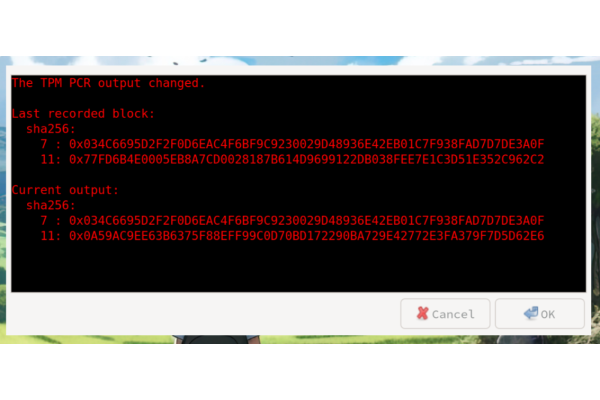
- Log Truncation:
After logging the new output, an awk script parses all blocks in the log file and retains only the last 10 entries (
MAX_RECORDS), keeping disk usage minimal and history relevant.
Usage & Automation
- make the script executable (
chmod +x pcr-watch.sh) - execute it on startup of your Desktop Environment. I use sway and have added it with
exec pcr-watch.sh - if you run the script as user check that the user is in the needed tss group. i have also created a polkit policy
/etc/polkit-1/rules.d/49-allow-user-tpm2-pcrread.rules
polkit.addRule(function(action, subject) {
  if (subject.user == "bigfreak" && action.id == "org.freedesktop.policykit.exec" && action.lookup("program") == "/usr/bin/tpm2_pcrread") {
    return polkit.Result.YES;
  }
});